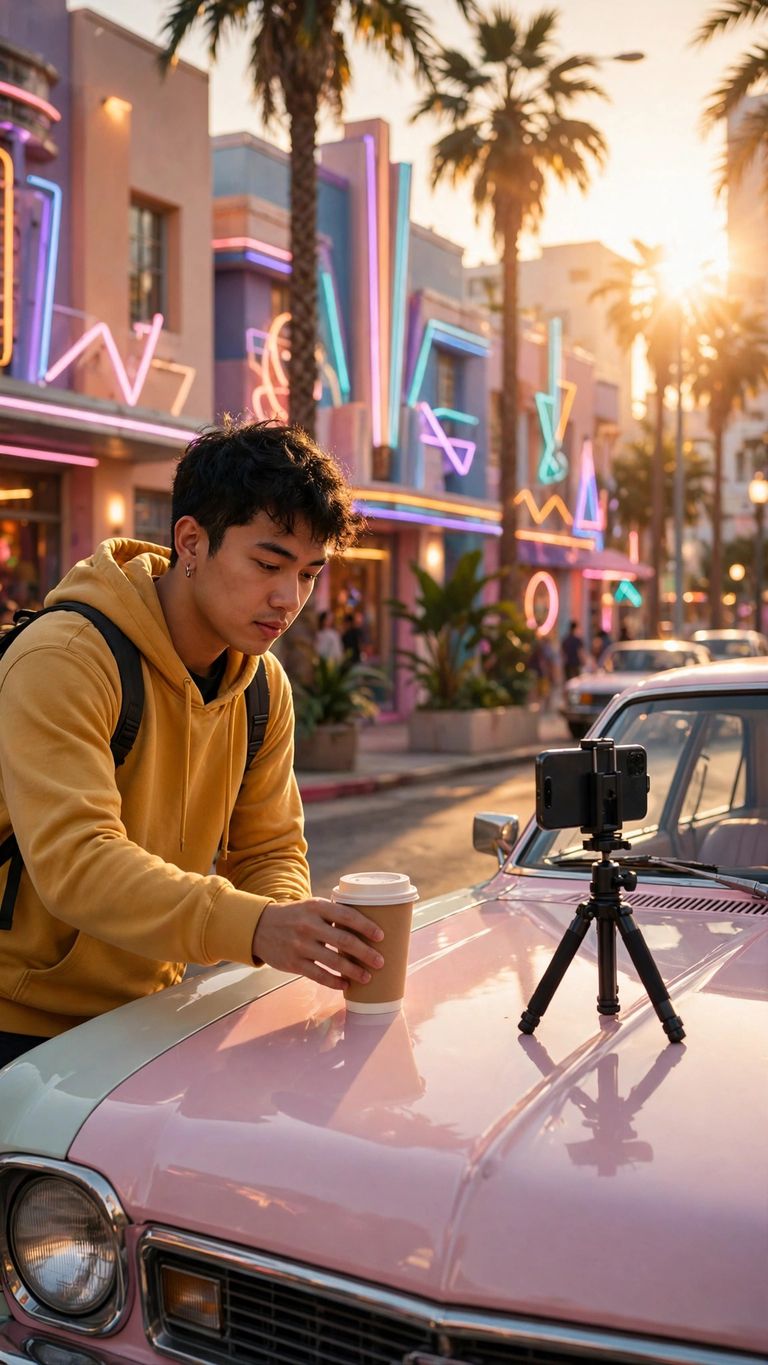
You have probably seen it while scrolling this week. A neon street in Vice City, palm trees, a sunset that looks straight out of a video game — and right in the middle of it, a coffee cup. Or a pizza box. Or a barbershop chair. The Your brand in GTA 6 trend takes a normal product and drops it into the world of GTA 6, as if it had always belonged there.
It is the number one trend on HeyOrca’s weekly CapCut trends page for this week, and the timing makes sense. GTA 6 launched on 19 November 2026, and ever since, the game has been everywhere — on gaming feeds, on news pages, and now on Reels and TikTok from brands that have nothing to do with gaming at all. The joke is simple: what would your product look like if it existed inside the game?
The good news is that you do not need to own the game, and you do not need to know how to play it. You need one clear photo of your product, an AI image tool, and CapCut. This guide walks through the whole thing — what the trend actually is, how to build your version, the mistakes that make it look cheap, and how to post it so people get the joke in the first two seconds.
What Is the “Your Brand in GTA 6” Trend?
The Your brand in GTA 6 trend is a short video format where a brand or a creator shows their product inside a scene that looks like it came from GTA 6. The scene is usually a sunny Vice City street, a beach, a neon-lit night road, or a game-style loading screen. The product sits in the scene naturally — a coffee cup on a car bonnet, a pair of trainers on a sidewalk, a salon chair outside a shopfront — and the video is edited to feel like a clip from the game.
Most versions follow the same loose shape. The video opens on the game-style scene with the product already in it. A bold text overlay names the product or the brand, sometimes styled like game text. The camera slowly zooms or pans, the way a game trailer would. The whole clip is usually under ten seconds, and the joke lands because the product clearly does not belong in the game — and that is the point.
The format works for almost any product that people can recognise at a glance. Food and drink brands are the most obvious fit, because a burger or a coffee cup reads instantly even in a busy scene. But the trend has also been picked up by local shops, gyms, salons, clothing labels, and even a police department — HeyOrca highlighted the San Antonio Police Department’s version as a clever example of a non-gaming organisation joining the conversation with a connection that made sense for them. If your product has a clear shape and a clear colour, it can work.
One thing to keep clear from the start: this is a joke format, not an official collaboration. Nobody is claiming Rockstar Games put their product in the game. The humour comes from pretending, for a few seconds, that it did. Keep that tone in your caption too — a light line like “coming soon to Vice City” reads as a joke, while anything that sounds like a real announcement will confuse people and invite the wrong kind of comments.
Why This Trend Works Right Now
Timing is doing a lot of the work here. GTA 6 is the biggest game launch of the year, and its release on 19 November 2026 put Vice City back at the centre of every feed. When a game this big launches, even people who never play games recognise the look — the neon, the palm trees, the sunset light, the street scenes. That shared recognition is what makes the trend land with a general audience, not just gamers.
The format also solves a problem most small brands have on Reels: how do you show a product without making another boring product shot? A photo of a coffee cup on a table is easy to scroll past. The same coffee cup parked on a Vice City street, with game-style text and a slow cinematic zoom, makes people stop. The scene does the stopping; the product just has to be in it.
And it is cheap to make. There is no filming in a real location, no game console, and no editing skill beyond the basics. The scene is generated, the product is a photo you already have, and the edit is a zoom, a text overlay, and an export. That is the whole production. For a small business or a solo creator, that is a rare combination — a format that looks expensive and costs almost nothing.
What You Need Before You Start
You do not need much, but getting the pieces ready before you open any app saves a lot of back and forth later.
First, a clean photo of your product. Pick your most recognisable one — the item people already associate with you. The photo should be taken against a plain background, in good light, with the whole product in frame. If the photo is cluttered, dark, or cropped halfway, the AI image tool will struggle to place it cleanly in the scene, and the result will look messy. One good photo beats five average ones here.
Second, an AI image tool that can edit or generate images from a prompt. The exact tool matters less than knowing how to describe what you want. Tools like ChatGPT image generation, Gemini, Leonardo, or any image generator you already use will work. If you have never used one before, pick one and stick with it for this whole project — switching tools halfway through is how people end up with two different-looking scenes that do not match.
Third, CapCut on your phone, updated to the latest version. The whole edit happens there: the zoom, the text, the export. Make sure you have enough free storage for the export, because a 1080×1920 video with effects takes more space than a normal clip.
Fourth, a short list of the words you want on screen. Keep it to one short line — your product name, or a one-line joke. Long text on a busy game scene is hard to read, and people will not pause to read it. Decide the line before you start editing, not while you are staring at the timeline.
How to Make Your Brand in GTA 6 Reel: Step by Step
Step 1: Pick the scene
Start by deciding where your product lives in the game world. A coffee shop product fits a sunny street with a cafe front. A gym product fits a beach or a parking lot at golden hour. A food product fits a night street with neon signs. The scene should feel like Vice City — warm light, palm trees, wide streets, bright colours — because that is the look people recognise instantly.
Write the scene down in one sentence before you generate anything. For example: “a takeaway coffee cup sitting on the bonnet of a car on a sunny Vice City street, palm trees and neon shop signs behind it.” That sentence becomes the core of your image prompt, and having it written down stops you from changing your mind with every generation.
Step 2: Generate the game-style image
Open your AI image tool and upload the clean product photo if the tool supports image editing. If it does not, you will be working from a text prompt alone, and you will need to describe the product in detail — its shape, its colours, any logo or label on it.
A prompt that works well looks something like this: “Place this coffee cup on the bonnet of a car on a sunny street in Vice City, in the style of a GTA 6 game scene. Warm sunset light, palm trees, neon shop signs in the background, cinematic video game look, realistic, 9:16 vertical.”
Generate a few versions and pick the one where the product still looks like your product. That is the test that matters. A beautiful scene with a coffee cup that looks nothing like yours is useless — people need to recognise the product in under a second. If the tool changes the logo, the colour, or the shape, regenerate with a clearer description of the product, or upload a better reference photo. Do not settle for a version where your product is unrecognisable; the whole joke depends on recognition.
Step 3: Build the video in CapCut
Open CapCut and start a new project with your generated image. Set the project to 9:16 vertical, which is the format for Reels and TikTok. If your image came out in a different shape, crop it to fill the frame — black bars on the sides make the whole thing look unfinished.
Add a slow zoom to the image. In CapCut, this is a keyframe zoom: set the starting frame slightly zoomed out and the ending frame slightly zoomed in, over the full length of the clip. Keep the movement slow and steady. A fast zoom feels frantic; a slow zoom feels like a game trailer. Three to six seconds is a good length for the clip — long enough for people to take in the scene, short enough that they do not get bored.
Add your one line of text. Use a bold, condensed font in white with a black outline so it stays readable over a bright scene. Place it in the lower third of the frame, not in the middle, so it does not cover the product. Keep it short: your product name, or a line like “Now available in Vice City” if you want the joke to land harder.
If your version has music, add it in CapCut from the audio library, and keep the volume low enough that it supports the clip rather than drowning it. If you are posting to Instagram, check that the sound is available for Reels in your region before you export — a muted or unavailable track is one of the most common reasons a good Reel underperforms, and it is easy to check in advance.
Step 4: Export and check before posting
Export at 1080×1920, which is the standard size for Reels and Shorts. Before you post, watch the exported video on your phone from start to finish, with the sound on. Check three things: can you read the text easily, does the product look like your product, and does the zoom feel smooth? If any of the three is off, fix it now. Re-exporting takes a minute; re-posting a version you are not happy with takes much longer to undo.
Ideas for Different Kinds of Brands
The format is flexible, and the best versions come from thinking about what makes your product recognisable. Here are a few starting points — pick the one closest to what you sell and adapt it, rather than copying any single version you have seen.
A cafe or coffee brand can place a cup on a car bonnet, a beach wall, or a street table, with the line “Now serving in Vice City.” A bakery can put a cake box on a sunny sidewalk outside a pastel shopfront. A gym or fitness page can place a dumbbell or a protein shaker on a beach at golden hour, with the line “Vice City’s new gym.” A clothing label can hang its best-selling jacket on a chair outside a neon-lit shop. A barbershop can put a barber chair on a street corner with palm trees behind it. A local shop can place its most recognisable product outside a storefront that looks like a game location.
The pattern is always the same: one recognisable product, one clear game-style scene, one short line of text. If you add a second product, a second line of text, or a second scene, the clip gets crowded and the joke gets harder to follow. One of each is enough.
Common Mistakes to Avoid
The first mistake is picking a product photo that is too dark or too busy. The AI tool needs a clear reference to work from, and a cluttered photo gives it cluttered results. If your best product photo is not clean, take a new one against a plain wall in daylight before you start. Five minutes of photography saves an hour of regenerating.
The second mistake is letting the AI change your product. If the logo comes out wrong, the colour shifts, or the shape looks off, do not post it. Your audience knows what your product looks like, and a wrong version looks like a mistake, not a joke. Regenerate with a better reference photo or a more specific description of the product.
The third mistake is too much text. The scene is already busy — neon, palm trees, a car, a street. A paragraph of text on top of it is unreadable, and people will not pause to read it. One short line is the limit. If you have more to say, put it in the caption, not on the video.
The fourth mistake is making the clip too long. The joke lands in the first two seconds, and after that you are just showing the same scene again. Three to six seconds is enough. If your version runs past ten seconds, cut it down — the extra seconds are not adding anything.
The fifth mistake is forgetting the caption. The video gets the stop, but the caption gets the comment. A short caption that plays along with the joke — something like “POV: your favourite coffee shop opens a branch in Vice City” — gives people something to react to. Ask a simple question too, like “What should we open next in Vice City?” Questions like that are easy to answer, and easy answers are what get comments started.
The sixth mistake is using a sound that is not available on the platform you are posting to. This catches people out more often than any editing error. Before you export, check the sound in the app you are posting to, or use a sound from CapCut’s own library that you know is cleared for Reels and TikTok. A video with no sound, or with a muted track, loses a large part of its effect.
Posting Tips
Post the Reel when your audience is normally online — for most small brands, that is late morning or early evening, when people are scrolling on a break or after work. There is no magic time that works for every account, so use the time that has worked for your previous posts rather than chasing a generic best time.
Write the caption in the same joking tone as the video. One or two lines is enough, plus a simple question. Add a few relevant hashtags — the trend name, GTA 6, and your usual niche tags — but do not fill the caption with twenty hashtags. A short, clean caption reads better and looks more confident.
Pin the Reel to your profile for a few days while the trend is current. Trends move fast, and this one is tied to a game launch, so its window is measured in weeks, not months. If you are going to make your version, make it now rather than next month, when the feed will have moved on to the next launch.
Frequently Asked Questions
What is the Your brand in GTA 6 trend?
The Your brand in GTA 6 trend is a short video format where a brand or creator places their product inside a scene that looks like it came from GTA 6 — usually a sunny Vice City street, a beach, or a neon-lit night road — and edits it to feel like a clip from the game. It is currently the top trend on HeyOrca’s weekly CapCut trends page.
Do I need to own GTA 6 to make this trend?
No. The scene is generated with an AI image tool, not captured from the game. You need a clean photo of your product, an image generator, and CapCut. You do not need a console, the game, or any gameplay footage.
Which AI image tool should I use?
Use whichever image generator you already know — ChatGPT image generation, Gemini, Leonardo, or a similar tool all work for this. The tool matters less than the prompt: describe the scene clearly, name the product in detail, and ask for a 9:16 vertical game-style image.
How long should the Reel be?
Three to six seconds is enough. The joke lands in the first two seconds, and the slow zoom carries the rest. Longer versions tend to lose people, because the scene does not change.
Can any product work in this trend?
Almost any product with a clear, recognisable shape and colour can work — food and drink, clothing, gym gear, salon tools, and local shop products are all good fits. The test is simple: if someone can recognise your product in under a second, it will work. If the product is small, plain, or hard to identify, pick your most distinctive item instead.
Is it okay to use the GTA 6 look in my video?
The trend is a joke format, not an official collaboration, and the versions circulating are fan-made. Keep your video clearly playful — a light caption, a joke line on screen — and do not present it as an official announcement or a real partnership. That keeps the tone honest and avoids confusing your audience.
Final Thoughts
The Your brand in GTA 6 trend works because it does something most product content does not: it puts the product somewhere unexpected, and lets the scene do the work. You do not need a big budget, a game console, or editing experience. You need one good product photo, a clear image prompt, a slow zoom in CapCut, and one short line of text.
Make your version while the trend is current. GTA 6 just launched, the format is at the top of this week’s trend lists, and the window for a launch-tied joke is short. Pick your most recognisable product, generate the scene, check the export on your phone, and post it with a caption that plays along with the joke. Then watch the comments — and see which of your products your audience wants to see in Vice City next.
Related reads
- Do We Still Look the Same CapCut Template: How to Make the 2016 vs 2026 Comparison Reel Everyone Is Posting in November 2026
- Lion Friend CapCut Template: How to Make the One-Photo AI Hug Video Everyone Is Posting
- Self Hug AI Photo: How to Make the Pencil-Sketch Hug Video Everyone Is Posting in November 2026
- Zombie Love Story CapCut Template: How to Make the Zombie Hug Video Everyone Is Posting in November 2026
- AI Crying Farewell CapCut Template: How to Make the Smile-Breaks Farewell Video Everyone Is Posting in November 2026
- Fancy Cafe CapCut Template: How to Make the First Time in a Fancy Cafe Reel Everyone Is Posting in November 2026