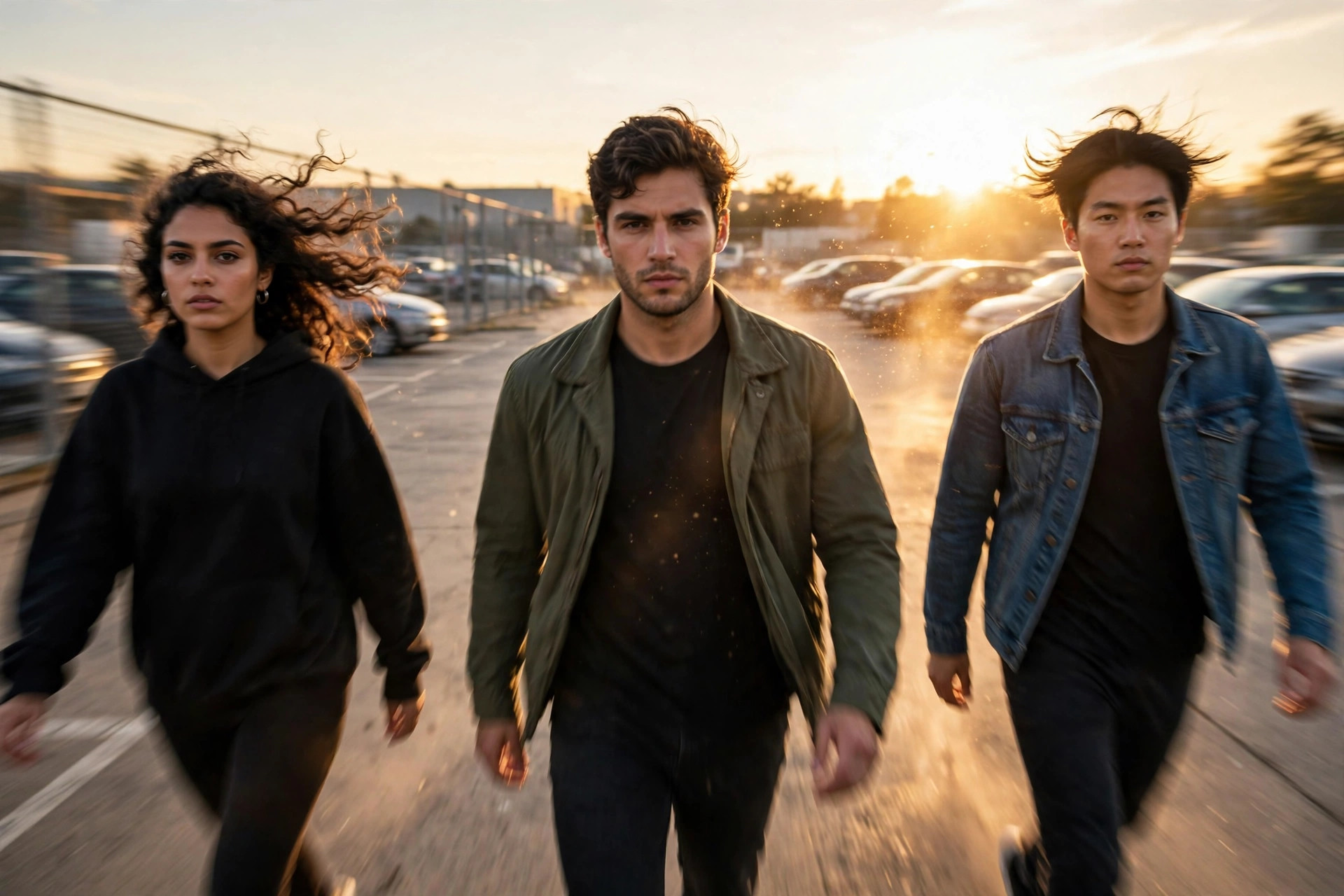
The car park that turned into a movie scene
Last Saturday, I watched three friends turn an ordinary car park into something that looked straight out of an action film. No fancy camera. No crew. Just one phone on a tripod, a song everyone knows, and three people who were fully committed to walking in like they owned the place.
One of them came in from the left, slow, shoulders back, sunglasses on even though the sun was already going down. The second strolled in from the right, hands in pockets, not smiling at all. The third just appeared from behind the camera, like he had been waiting for his cue all day.
It lasted about twelve seconds. And I replayed it four times.
That is the Pray For Me slow-mo run in a nutshell. Friends take turns entering the frame in exaggerated slow motion, set to “Pray For Me” by The Weeknd and Kendrick Lamar, and the joke is how seriously everyone takes it. The more ordinary the location, the funnier and more cinematic it looks. A car park, a college corridor, a kitchen doorway — all of it works, because the contrast is the whole point.
I tried it the next day with my own friends, and I will be honest: our first attempt looked less like a movie and more like three people who had forgotten how to walk. The second attempt was better. The third one was the one we posted. So if your first try feels awkward, that is normal. This format lives or dies on timing, commitment, and a couple of small phone settings most people skip.
What the Pray For Me slow-mo run actually is
Strip away the hype and the format is simple. A group of two to four people enter the frame one by one, in slow motion, while “Pray For Me” plays. Each entrance is dramatic on purpose. Slow steps. A serious face. Maybe a coat flick, a hair toss, or a look straight into the lens at the end.
It is not a dance trend, and you do not need to learn choreography. That is part of why it spreads so fast. Anyone with friends and a phone can try it, and the best versions are not the most polished ones. They are the ones where everyone commits to the bit without laughing halfway through.
Trend trackers spotted this format again in the week of 26 October to 1 November 2026, with friends running or walking into frame one at a time in exaggerated slow motion. That timing matters. Formats like this tend to run for a few weeks, not forever, so if you want to try it, this is a good window — while people still recognise the sound and the joke instantly.
One honest note before we go further: no format guarantees views. What this one does give you is a clear, instantly readable idea in the first second, and that is half the battle on Reels and TikTok. The rest comes down to how well you shoot it.
What you need before you film
You do not need much, and that is the beauty of it.
- A phone that can shoot slow motion. Most modern Android phones and iPhones have a Slo-Mo mode built in. Check yours before you go out.
- A tripod, or something steady to prop the phone on. A wall, a bag, a parked car roof — anything beats a shaky hand for this format, because slow motion makes every wobble ten times more obvious.
- Two to four friends who are willing to look ridiculous for about ten seconds. One person can do a solo version, but the group entrance is where the format really lands.
- The sound. Search for the slowed “Pray For Me” audio inside TikTok or Instagram before you film, and save it. Do not rely on remembering the exact version later, because there are several edits floating around and the pacing is different in each one.
- A location with depth. A long corridor, a street, a car park, a park path. You want room for people to walk toward the camera, not just step sideways into frame.
I made the mistake of filming our first attempt in a tiny room. Everyone was in frame within two steps, the slow motion had nowhere to go, and the whole thing felt rushed. Moving outside to a longer walkway fixed it instantly.
Step 1: Pick your location and lock the camera
Find a spot where the camera can see a good stretch of ground in front of it. Place the phone about waist height or a little lower — low angles make entrances look more dramatic, which is exactly what you want here.
Frame it wide. Leave space on the left and right edges, because people will enter from the sides. If you frame too tight, the first person will already be centre-frame before the slow motion has time to breathe.
Lock the exposure and focus if your phone allows it. On iPhone, press and hold on the main subject area until the AE/AF lock appears. On most Android phones, a long press does the same thing. This stops the phone from suddenly brightening or refocusing mid-entrance, which ruins the cinematic feel.
Film in good light if you can. Golden hour — that last hour before sunset — is ideal, but bright daylight works too. Avoid filming with a bright sky directly behind people unless you want silhouettes, because faces will go dark and the serious expressions, which carry the joke, will disappear.
Step 2: Shoot in slow motion, not just slowed down later
This is the step most people get wrong, and I got it wrong too on my first try.
You have two options. You can record in your phone’s Slo-Mo mode, which captures more frames per second and gives you genuinely smooth slow motion. Or you can record at normal speed and slow the clip down in CapCut afterwards.
Recording in Slo-Mo mode looks better. The movement stays smooth instead of choppy. On iPhone, open Camera, swipe to Slo-Mo, and shoot at 240 fps if your phone offers it. On Android, look for Slow Motion in the camera modes — 120 fps is usually enough, 240 fps is even smoother if you have it.
If you slow a normal clip down in editing instead, keep it to about 0.5x speed. Any slower and the movement starts to stutter, and the whole cinematic effect falls apart. I tried 0.25x on a normal-speed clip once and it looked like a slideshow. Lesson learned.
One more practical thing: slow-motion clips take up more storage and the audio will sound stretched and weird in the raw file. Do not worry about that. You will mute the original audio and lay the trending sound over the top in editing.
Step 3: Plan the entrances like a tiny scene
Do not just tell everyone to “walk in whenever.” Plan it, even if it takes two minutes.
Decide the order. The most confident walker should probably go first, because they set the tone. The funniest or most unexpected person should go last, because they get the final beat before the video loops or cuts.
Give each person a different entrance. One from the left, one from the right, one from behind the camera, one walking straight toward the lens from far away. If everyone comes from the same side, it looks like a queue, not a movie scene.
Tell each person to pick one small gesture and stick to it. Adjusting sunglasses. Fixing a jacket collar. A slow head turn toward the camera at the end. One gesture per person is plenty. When I let everyone improvise three gestures each, it turned into chaos. One clear move reads far better in slow motion.
And the face matters more than the walk. Serious. Almost too serious. The humour comes from the gap between how dramatic you look and how ordinary the place is. If everyone is giggling, the joke collapses. Save the laughing for after you have a clean take.
Step 4: Time the entrances to the music
This is where a good version separates itself from a forgettable one.
Listen to the sound a few times before filming. Notice where the beat drops or where the vocal phrase lands. Each entrance should land on a beat, not drift in randomly. You do not need to be musically precise — just roughly in time.
A simple way to do it: have one person off camera count or clap the beat, or play the song out loud on another phone while you film. Yes, the on-camera audio will be messy, but you are going to replace it anyway. What matters is that the walking matches the rhythm.
Keep each entrance short. About two to three seconds of slow-motion walking per person is enough. If someone takes six seconds to cross the frame, viewers will swipe before the second person even appears. Short, punchy entrances keep the whole video under fifteen seconds, which helps completion rate — and completion rate is what pushes a Reel or TikTok further.
Film three or four full takes. Do not settle for the first one. In our case, take one had a car driving through the background, take two had someone laughing, and take three was the keeper. You will almost never get it clean on the first go, and that is fine.
Step 5: Edit it in CapCut (or in-app) in under ten minutes
Import your best take into CapCut. This is the part I used to overcomplicate, adding filters and transitions until the video looked worse than the raw clip. Keep it simple.
First, mute the original audio. Then add the saved “Pray For Me” slowed sound. Line up the first entrance with the first strong beat. Trim the start so there is no dead air before the first person appears — viewers decide in the first second whether to stay, so do not waste it on an empty frame.
If you recorded at normal speed instead of Slo-Mo mode, select the clip, tap Speed, and set it to 0.5x. If you recorded in Slo-Mo mode, you probably do not need to slow it further. Check the playback: it should feel deliberate and heavy, not floaty.
Add text only if it helps the joke. A short caption like “POV: the group chat actually showed up” or “When everyone takes the entrance way too seriously” can frame the video for people who do not know the trend yet. Keep it to one line, large enough to read on a phone, and place it where it does not cover faces.
Colour-wise, a slight contrast boost or a warm filter is enough. Slow motion already looks cinematic. Piling on effects fights against that.
Export in 1080×1920, 30 fps, and check the exported file before posting. I once posted a version where the sound was half a second out of sync and only noticed after it was live. A thirty-second preview saves that embarrassment.
Variations that still feel fresh
Once you have the basic version down, you can bend the format without breaking it.
The workplace version works well: colleagues entering a shop, a classroom, or an office in slow motion, as if arriving for the biggest shift of the week. The contrast between a serious entrance and a totally normal job is what makes people share it.
The solo version is simpler: film yourself walking toward the camera from a distance, then cut to a close-up as you pass the lens. It loses the group energy, but it still works if your walk and your expression are confident.
The pet or family version is the wildcard. A dog trotting in slow motion with the same dramatic music gets shared for a completely different reason, and it tends to do well because people do not expect it.
What does not work, in my experience, is copying someone else’s exact entrances, outfits, and caption word for word. Viewers have already seen that version. Change the location, change the order, change the joke. The format is the skeleton — your group is what makes it yours.
Common mistakes to avoid
I made most of these, so consider this the shortcut version.
Filming handheld is the first one. Slow motion magnifies shake, and a wobbly cinematic entrance just looks seasick. Use a tripod or prop the phone somewhere solid.
Filming too tight is the second. If the frame is already full, there is no entrance — there is just a person appearing. Leave space.
Laughing mid-take is the third. It is tempting, and it is almost always what ruins an otherwise good take. Keep a straight face until the director — usually whoever is holding the phone — calls cut.
Over-editing is the fourth. Extra transitions, speed ramps every two seconds, three different filters. The format is already dramatic. Let it be dramatic.
And finally, using the wrong audio version. If the sound you add does not match the version people recognise, the video loses its instant context. Search the exact slowed “Pray For Me” sound in the app, check that it is the one other creators are using that week, and save it before you film.
Will it work for a small account?
Honestly, this is one of the better formats for a small account, because it does not depend on a big following or expensive gear. It depends on a clear idea, a recognisable sound, and a take where everyone commits.
That does not mean it will automatically take off. Short-form feeds are crowded, and plenty of well-shot videos still get modest numbers. What I can say from watching this format spread is that the versions that travel tend to share three things: the first entrance happens immediately, the location is relatable, and the group looks like they are genuinely enjoying the joke.
Post it, watch how people react in the first few hours, and if the entrances felt off, film it again in a different location rather than reposting the same clip. A second, better take almost always beats a re-upload.
Final thoughts
The Pray For Me slow-mo run is not complicated, and that is why it works. A phone, a few friends, a long walkway, and a willingness to look completely serious in a completely unserious place. Get the slow motion right, time the entrances to the beat, keep the edit simple, and you have a video that people understand in one second and remember after it ends.
Film it this week while the sound is still fresh in people’s feeds. And if your first take looks like three people who forgot how to walk — welcome to the club. Take three is usually the one.
Frequently asked questions
Do I need to film in Slo-Mo mode, or can I slow it down in CapCut?
Slo-Mo mode looks smoother because it captures more frames per second. Slowing a normal clip to 0.5x in CapCut works too, but going much slower than that usually turns choppy.
How many people do I need for the Pray For Me slow-mo run?
Two to four works best. One person can do a solo version, but the group entrance — one person at a time, from different directions — is what makes the format recognisable.
What song is used in the Pray For Me slow-mo run?
The format uses “Pray For Me” by The Weeknd and Kendrick Lamar, usually a slowed edit of the track. Search for the slowed version inside TikTok or Instagram and save the exact one other creators are using that week, since audio availability can vary by account.
How long should the video be?
Aim for under fifteen seconds, with each entrance lasting about two to three seconds. Short videos are easier to watch all the way through, and that completion helps reach.
Why does my slow-motion video look shaky?
Slow motion magnifies camera shake. Use a tripod or a solid surface, and avoid walking while holding the phone. A locked-off camera makes the whole thing look far more cinematic.
Can businesses or teams use this format?
Yes. A team arriving for a shift, a shop opening, or a group walking into an event all fit the format, as long as the entrances stay playful and the setting stays relatable. Keep it light — the humour is in taking an ordinary moment far too seriously.
Related reads
- Shaking Head AI Meme: How to Make the Slow Head-Shake Meme Everyone Is Posting in October 2026 — https://viralvideo.website/shaking-head-ai-meme-reel/
- Ceiling Fan Outfit Transition: How to Film the Spinning Outfit Reveal Everyone Is Copying in October 2026 — https://viralvideo.website/ceiling-fan-outfit-transition-reel/
- It’s Making Sense Now: How to Film the Pretend-to-Understand Reel Everyone Is Copying in October 2026 — https://viralvideo.website/its-making-sense-now-reel/
- Upside Down Reels: How to Make the Flip Transition Everyone Is Copying in October 2026 — https://viralvideo.website/upside-down-reels-flip-transition-capcut/
- GRWM Loading Reel: How to Make the 0 to 100 Percent Format in CapCut — https://viralvideo.website/how-to-make-grwm-loading-reel-capcut/
- Ramalama Costume Walk: How to Make the Slow Creepy Costume Reveal Everyone Is Copying for Halloween 2026 — https://viralvideo.website/ramalama-costume-walk-reel/